
Build a Quote Request Form to Attract Serious Clients in Minutes
Design a quote request form that gathers project details and attracts high-quality client inquiries.
If you are receiving too many “just checking the price” enquiries and not enough genuine buyers, your quote request form might be the issue.
A strategically designed quote form does not just collect information — it pre qualifies leads, filters out time wasters, and attracts serious clients who are ready to proceed.
In this guide, you will learn how to create a quote request form that converts enquiries into high quality business opportunities using SmartFormify.
Why Most Quote Forms Fail
Many businesses make one of these mistakes:
- Asking only for name, email, and “What do you need?”
- Making the form too lengthy and overwhelming
- Not qualifying the budget
- Not setting clear expectations
- Not guiding clients with structured choices
The result? Low quality enquiries and endless back-and-forth emails.
Let’s improve that.
1. Start With the Right Structure
A high converting quote request form usually follows this structure:
- Contact Information
- Project Overview
- Budget Qualification
- Timeline
- Additional Details
- Confirmation & Expectations
With SmartFormify, you can create multi step forms that guide users smoothly through each section making the process feel simple rather than exhausting.
2. Use Multi Step Forms
Long forms can discourage users. Multi step forms improve completion rates because they:
- Break information into smaller sections
- Show a progress indicator
- Feel interactive and organised
- Reduce mental overload
Instead of one long page, divide your form into logical steps like:
Step 1: About You .
Step 2: About the Project .
Step 3: Budget & Timeline
SmartFormify makes this easy with Smart Flow system.

3. Add Budget Ranges
This is one of the most important elements.
Instead of asking:
“What is your budget?”
Use structured ranges such as:
- $2,500 – $5,000
- $5,000 – $10,000
- $10,000 – $20,000
- $20,000 – $40,000
- $40,000+
Why this works:
- Serious clients are comfortable selecting a range.
- Casual price checkers often leave the form.
- You instantly qualify the lead.
Tip: Make this field compulsory.
4. Ask Specific, Guided Questions
Avoid unclear questions like:
“Tell us about your project.”
Instead, guide them with structured options:
- What service do you require?
- Which industry are you in?
- Do you already have branding?
- Do you need ongoing support?
With SmartFormify’s conditional logic, you can display questions based on earlier responses making the form feel personalised.
Example: If they select “Website Design,” show hosting and CMS-related questions. If they select “Branding,” show logo and style guide questions.
This approach feels professional and well organised.
5. Set Clear Expectations at the End
Before submission, include a message such as:
“We review all requests within 24 hours. Projects typically start at $5,000. If your project is a suitable fit, we will schedule a discovery call.”
This helps to:
- Reinforce your positioning
- Prevent unrealistic expectations
- Attract committed clients
You can easily add this as a confirmation message inside SmartFormify.
6. Maintain a Professional Design
Your quote form represents your brand.
To build trust:
- Use clean spacing
- Maintain consistent fonts
- Avoid excessive colours
- Add your logo
- Use confident, clear language
A polished form signals credibility and professionalism.
7. Add a “Serious Enquiry” Confirmation
A powerful strategy is to include a required checkbox:
☐ I understand that projects start at $5,000 and I am prepared to proceed if we are a good fit.
This small step significantly improves lead quality.
8. Reduce Back-and-Forth Communication
Instead of sending follow up emails to ask:
- What is your deadline?
- Who is the decision maker?
- Do you have content ready?
Collect this information upfront.
Every unanswered question costs time. Every clear response saves hours.
SmartFormify allows file uploads, dropdowns, and structured fields so you receive complete information before scheduling a call.
How to Create This Quote Form Using SmartFormify
Instead of just knowing the layout, here is how you can actually build this high-converting quote form inside SmartFormify.
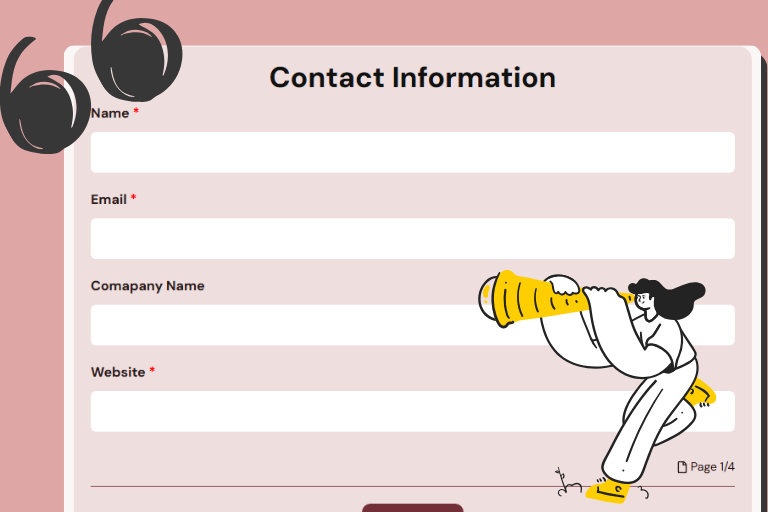
Step 1: Add Contact Details
Log in to SmartFormify and click Create New Form button. Drag and drop the following fields:
- Name (Required)
- Email (Required)
- Company Name
- Website
Keep this page simple so users move to the next step quickly.
Step 2: Add Project Details
Add:
- Dropdown for “Service Required”
- Paragraph field for “Project Description”
- Dropdown or text field for “Industry”
- File Upload field (Optional)
You can also enable conditional logic to show different questions based on the selected service.
Step 3: Add Qualification Filters
This is where you filter serious clients.
Add:
- Budget Range (Required – use radio buttons or dropdown)
- Timeline field
- Yes/No question: “Are you the decision maker?”
Making the budget field compulsory helps improve lead quality.
Step 4: Add Confirmation & Expectation Message
In the final step:
- Add a short message like: “Projects start at $5,000. We review requests within 24 hours.”
- Add a required agreement checkbox
- Customise the Submit button (Example: “Request My Quote”)
You can also set up email notifications and a thank you message in SmartFormify settings.
Once finished, preview the form, adjust colours to match your brand, and publish it. You can embed it on your website or share the direct link.
Common Mistakes to Avoid
❌ Too many open ended questions
❌ No budget qualification
❌ One long, cluttered page
❌ No timeline field
❌ No expectation setting
❌ Poor mobile optimisation
Address these issues, and you will notice an immediate improvement in lead quality.
Final Thoughts: Your Form Is Your First Filter
A quote request form is not merely a contact replacement.
It is:
- A filter
- A positioning tool
- A professionalism signal
- A time saving system
When built properly using SmartFormify, your form will not just collect enquiries it will attract serious clients who are ready to invest.
Share this post


Latest posts
8 min read
How to Collect Leads From ChatGPT, Lovable, Bolt and Other AI Websites
7 min read
How to Connect AI Built Websites to a Form Backend
8 min read
How Agencies Can Manage Client Website Forms More Efficiently
8 min read
Best Contact Form Solution for Small Businesses
5 min read
How to Centralize Leads From Multiple Websites