
CRM Integration With Website Forms for Better Lead Management
Turn visitors into clients with SmartFormify. Build, share, and embed forms easily, with CRM integration for smarter lead management.
Turning website visitors into loyal clients isn’t easy. Many businesses struggle not only to capture leads effectively but also to follow up on inquiries in a timely manner. As a result, valuable opportunities often slip through the cracks.
This is where SmartFormify comes in. SmartFormify is a no code form builder designed to simplify how you collect and manage information from your website visitors. With its intuitive design, you can create clear, structured forms that seamlessly integrate with your CRM—helping you respond faster, stay organized, and turn every interaction into a potential business opportunity.
Why Website Forms Matter for Lead Management
Before diving into tools and features, let’s understand why forms are so important. Your website is often the first point of contact between you and a potential client. Visitors may browse your site, learn about your products or services, but unless they reach out, there’s no way to convert them into leads.
Forms act as the bridge between curiosity and action. They give visitors a simple way to share their information, ask questions, or request services. The key is designing forms that are intuitive, quick to fill out, and tailored to your business needs.
Poorly designed forms can frustrate users and lead to abandoned submissions. On the other hand, clear and structured forms—like those created with SmartFormify—encourage engagement and make it easier to follow up.
SmartFormify: Building Forms Without Coding
One of the biggest advantages of SmartFormify is that it eliminates the need for coding. You don’t need a developer or any technical experience to create professional forms. The platform offers an intuitive drag and drop interface, making form creation fast and accessible.
Whether you’re adding a contact form, an inquiry form, or a survey, SmartFormify allows you to customize every field, choose layouts, and apply logic to ensure the right questions are asked at the right time. This helps you collect the most relevant data without overwhelming your visitors.
Features That Make SmartFormify Stand Out
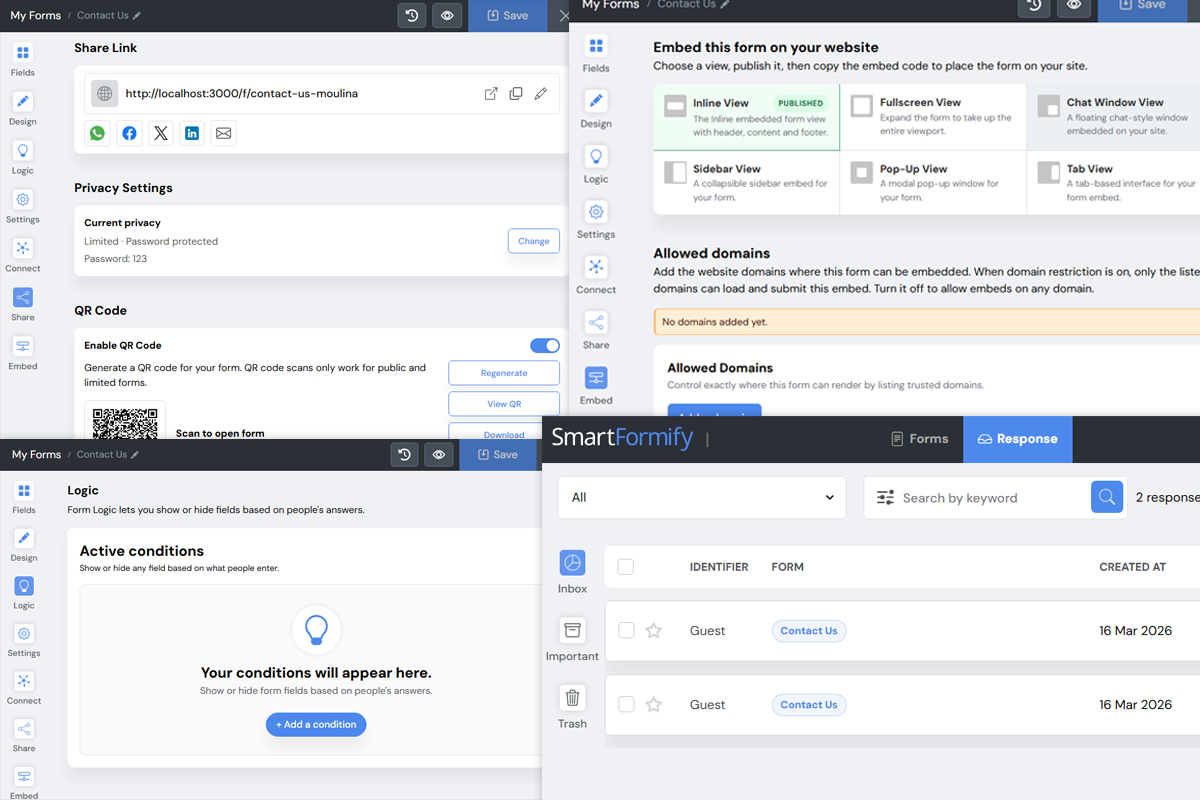
SmartFormify isn’t just another form builder. Its features are designed to make lead management easier and more effective:
- Easy Sharing: Forms can be shared via a direct link or QR code, making it simple for visitors to access them anywhere.
- Embed Anywhere: Seamlessly integrate your forms into web pages, landing pages, or email campaigns. No coding hassles.
- Conditional Logic: Ask follow-up questions based on responses, so your forms adapt to each visitor.
- CRM Integration: Automatically send form submissions to your CRM, keeping your leads organized and actionable.
These features ensure that your forms are not only user friendly but also serve as a powerful tool for lead capture and follow-up.
How CRM Integration Enhances Lead Management
Capturing a lead is only the first step. Without proper organization, follow-ups can get lost, and potential clients might slip through the cracks. Integrating SmartFormify with your CRM ensures that every submission is recorded, tracked, and ready for action.
CRM integration helps you:
- Automatically sync new leads with your sales pipeline.
- Segment leads based on form responses for targeted follow-ups.
- Set reminders and notifications for timely engagement.
- Analyze submission data to understand customer behavior and improve forms over time.
By connecting your forms to a CRM, you remove manual data entry, reduce errors, and make your lead management process far more efficient.
Best Practices for Effective Website Forms
Creating a form is easy, but making it effective requires thought. Here are some tips to get the most out of SmartFormify:
- Keep It Short and Simple: Long forms can discourage submissions. Only ask for essential information.
- Use Clear Labels: Make sure each field is labeled clearly so visitors know exactly what information is needed.
- Apply Conditional Logic: Only show relevant fields based on previous answers to make forms feel personal.
- Test Your Forms: Preview and test forms on desktop and mobile to ensure a smooth experience.
- Integrate With CRM: Ensure every submission is automatically routed to your CRM for timely follow-up.
Following these practices will help your forms perform better and increase the chances of converting visitors into clients.
Embedding and Sharing Forms: Reaching Visitors Everywhere
SmartFormify makes it easy to share your forms with your audience. You can:
- Embed Forms on Your Website: Add forms directly to landing pages, blog posts, or your homepage.
- Share Links: Send forms via email campaigns, social media, or newsletters.
- Use QR Codes: Place QR codes in physical locations, presentations, or brochures to capture leads offline.
These options ensure that your forms are accessible wherever your potential clients are, increasing the likelihood of engagement.
SmartFormify in Action: Simple Example
Imagine you run a small digital marketing agency. You want potential clients to submit an inquiry form about social media services.
- Using SmartFormify, you create a form with fields like Name, Email, Business Type, and Service Interest.
- Apply logic: If a visitor selects “Social Media Advertising,” additional questions appear about budget and preferred platforms.
- Embed the form on your website and share it via a campaign email.
- Each submission automatically flows into your CRM, assigned to the appropriate sales rep.
- Your team follows up within 24 hours, increasing the chance of converting a lead into a paying client.
This streamlined approach saves time, avoids errors, and maximizes every interaction.
Conclusion
Effective lead management starts with the right form. SmartFormify simplifies the process by offering a no code, user friendly platform to build, share, and embed forms that are both engaging and functional. With CRM integration, you can organize submissions, automate workflows, and follow up efficiently—turning website visitors into potential clients effortlessly.
For businesses looking to boost conversions, streamline inquiries, and improve lead follow-up, SmartFormify is the modern solution to a timeless challenge. It’s more than a form builder—it’s a tool for smarter business growth.

Share this post


Latest posts
8 min read
How to Collect Leads From ChatGPT, Lovable, Bolt and Other AI Websites
7 min read
How to Connect AI Built Websites to a Form Backend
8 min read
How Agencies Can Manage Client Website Forms More Efficiently
8 min read
Best Contact Form Solution for Small Businesses
5 min read
How to Centralize Leads From Multiple Websites