
How to Keep Your Existing Website Form Without Rebuilding It
Learn how to keep your existing website form without rebuilding it. Connect your current form to a modern backend and manage submissions more efficiently.
Many businesses spend time creating a website that reflects their brand.
They carefully choose the layout, colors, typography, and contact form design.
After the website goes live, they discover a problem.
The contact form is not working the way they expected.
Sometimes emails never arrive.
Sometimes submissions are lost.
Sometimes there is no way to review previous enquiries.
The first thought is often to rebuild the entire contact form.
In most cases, that is unnecessary.
If your form already looks good and your visitors can use it easily, you can usually keep it exactly as it is and simply improve what happens after someone clicks Submit.
Your Form Design Is Not the Problem
A contact form has two parts.
The first part is what visitors see.
This includes:
- Name field
- Email field
- Phone number field
- Message field
- Submit button
The second part works behind the scenes.
It receives the submitted information, sends notifications, stores responses, and manages customer enquiries.
Many businesses rebuild the visible part of the form when the real problem is the part that visitors never see.
Why Businesses Rebuild Forms
There are several reasons why people decide to replace an existing contact form.
They may think:
- The form is outdated.
- A different form builder will solve the problem.
- The design needs to change.
- The website must be rebuilt.
Often, none of these are true.
If your visitors already understand how to use the form, changing its appearance may create more work without solving the real issue.
Keep the Experience Your Visitors Already Know
Visitors become familiar with the way your website works.
If your contact form is clear and easy to complete, there is little reason to replace it.
Keeping the same form means you also keep:
- Your branding
- Your colors
- Your layout
- Your customer experience
- Your website design
Instead of rebuilding everything, you simply improve how submissions are handled.
Improve What Happens After Submission
The most important improvements usually happen after the visitor clicks Submit.
A modern submission system should be able to:
- Receive every enquiry
- Store submissions
- Send notification emails
- Show a thank you message
- Help reduce spam
- Keep customer enquiries organized
These improvements happen behind the scenes without changing the appearance of your website.
Avoid Losing Customer Enquiries
Relying only on email can become a problem.
Emails can be:
- Deleted accidentally
- Sent to spam
- Missed during busy days
- Difficult to search later
Saving every submission separately gives you a reliable history of customer enquiries.
If someone contacts your business again, you can quickly review their previous message.
Stay Organized
As your business grows, managing enquiries becomes more difficult.
Instead of searching through email folders, you can manage submissions from one dashboard.
This makes it easier to:
- Review responses
- Search previous enquiries
- Follow up with customers
- Track conversations
- Keep everything organized
A central dashboard saves time and helps prevent important enquiries from being overlooked.
Receive Notifications Immediately
Even when submissions are stored, receiving notification emails is still important.
Your team can respond quickly while knowing that every enquiry is also saved safely.
This gives you the convenience of email together with reliable submission management.
Help Reduce Spam
Public contact forms often receive unwanted automated submissions.
Good submission handling should include protection that helps reduce spam without making the form difficult for genuine visitors.
This improves both security and the overall customer experience.
You Do Not Need to Replace Your Website
Many businesses worry that improving their contact form will require rebuilding their website.
In most situations, this is not necessary.
Your existing website can stay exactly the same.
The improvements happen behind the scenes where submissions are received and managed.
This saves time, reduces costs, and avoids unnecessary redesign work.
Connect Your Existing Form Instead
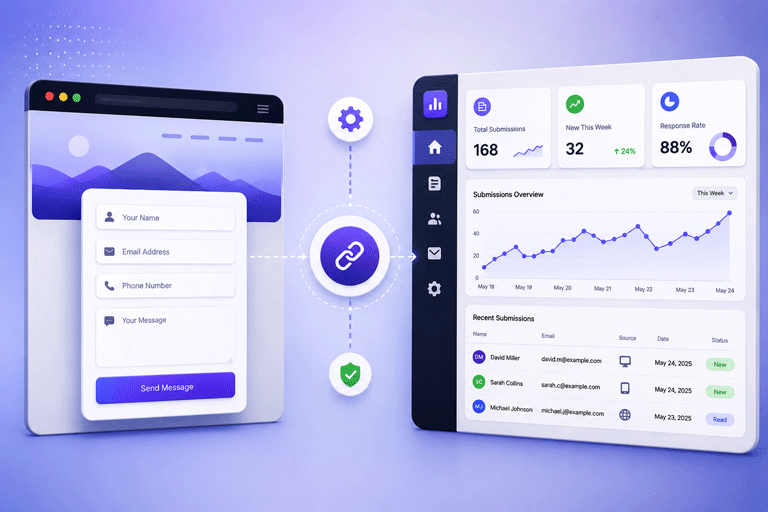
Rather than replacing your current form, you can connect it to a modern submission service.
This allows your existing website form to continue collecting customer enquiries while adding features that many older forms do not provide.
With SmartFormify Connect, you can keep the contact form already on your website and connect it to SmartFormify.
Once connected, SmartFormify can:
- Receive submissions
- Store responses
- Send notification emails
- Display after submission messages
- Help reduce spam
- Organize enquiries in one dashboard
Your visitors continue using the same form while your business gains a more reliable way to manage responses.
A Practical Example
Imagine a local plumbing company.
Its website has been online for several years.
Customers already know how to request a quote using the existing contact form.
The only problem is that some enquiries are missed because they rely only on email.
Instead of replacing the contact form, the company connects it to a submission management system.
Now every enquiry is stored, notifications are sent, and staff can review previous requests whenever needed.
The website looks exactly the same, but the business works much more efficiently.
Test Before Going Live
Whenever you connect an existing form to a new backend, always perform a few test submissions.
Check that:
- Submissions are received.
- Notification emails arrive.
- Responses are stored.
- Thank you messages appear correctly.
- Spam protection works as expected.
Testing helps ensure your customers have a smooth experience from the first day.
Common Mistakes to Avoid
Many businesses replace a perfectly good contact form when only the submission process needs improvement.
Others continue relying only on email and have no record of previous enquiries.
Some never test the form after making changes.
Avoiding these mistakes saves time and helps prevent lost business opportunities.
Final Thoughts
If your website form already looks professional and your visitors can use it easily, there is usually no reason to rebuild it.
The better solution is to improve what happens after the form is submitted.
By connecting your existing form to a modern submission service, you can keep the design your visitors already know while gaining reliable submission handling, notification emails, spam protection, and organized response management.
With SmartFormify Connect, you can continue using your existing website form while making it far more reliable for both your business and your customers.
Share this post


Latest posts
8 min read
How to Collect Leads From ChatGPT, Lovable, Bolt and Other AI Websites
7 min read
How to Connect AI Built Websites to a Form Backend
8 min read
How Agencies Can Manage Client Website Forms More Efficiently
8 min read
Best Contact Form Solution for Small Businesses
5 min read
How to Centralize Leads From Multiple Websites