
How to Send Website Form Notifications to Slack
Learn how to send website form notifications to Slack so your team can respond faster, stay informed, and manage customer enquiries more efficiently.
When someone submits a contact form, your team should know immediately.
Many businesses rely only on email notifications, but email is not always the fastest way to alert a team.
Messages can be missed, delayed, or buried under hundreds of other emails.
Slack has become one of the most popular communication platforms for businesses because it allows teams to receive updates instantly.
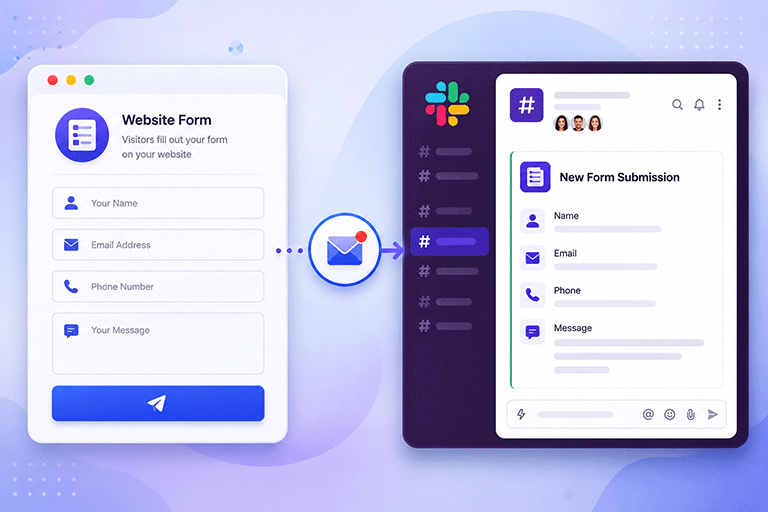
By sending website form notifications directly to Slack, your team can see new enquiries as soon as they arrive and respond much faster.
Why Send Form Notifications to Slack
Slack is designed for team communication.
Instead of waiting for someone to check their email, notifications appear where your team is already working.
This makes it easier to notice new enquiries and assign them to the right person.
For businesses that receive enquiries throughout the day, this can significantly improve response times.
Which Forms Can Send Slack Notifications
Almost any website form can send notifications to Slack.
For example:
- Contact forms
- Quote request forms
- Booking forms
- Support forms
- Feedback forms
- Job application forms
Every new submission can generate an instant notification for your team.
Respond to Customers Faster
Speed matters.
When a customer submits an enquiry, they often expect a reply within a reasonable time.
If your team sees the notification immediately, someone can begin responding much sooner.
Faster replies create a better customer experience and may increase the chance of winning new business.
Keep Everyone Informed
Slack makes it easy for everyone on your team to stay updated.
Instead of forwarding emails or sending messages manually, the notification appears automatically in the appropriate Slack channel.
Everyone who needs the information can see it without additional work.
Share Important Details
A useful Slack notification should include the most important information from the form.
For example:
- Customer name
- Email address
- Phone number
- Type of enquiry
- Message
- Submission time
This gives your team enough information to decide how quickly they should respond.
Continue Storing Submissions
Slack notifications are excellent for keeping your team informed, but they should not replace proper submission storage.
Every enquiry should also be saved in a dashboard.
This allows you to:
- Search previous submissions
- Review customer conversations
- Keep a permanent record
- Follow up later
Using Slack together with submission storage creates a much more reliable workflow.
Keep Your Existing Website Form
You do not need to redesign your contact form to add Slack notifications.
Your existing form can stay exactly as it is.
Visitors continue using the same form while notifications are sent behind the scenes.
This means your website design, branding, and customer experience remain unchanged.
Connect Slack With SmartFormify
SmartFormify allows you to connect your website forms with Slack.
Once connected, every successful submission can automatically send a notification to your chosen Slack workspace or channel.
At the same time, SmartFormify can also:
- Store submissions
- Send email notifications
- Display after submission messages
- Help reduce spam
- Organize responses in one dashboard
Your team receives instant Slack notifications while every enquiry is also stored safely for future reference.
A Practical Example
Imagine a digital marketing agency.
Every day, new businesses submit quote requests through the agency website.
Previously, the sales team only received email notifications.
Sometimes enquiries were not noticed for several hours because team members were busy with meetings or client work.
After connecting the contact form to Slack through SmartFormify, every enquiry now appears instantly in the sales channel.
The team can immediately see new requests, discuss them, and decide who should respond.
Customers receive faster replies, and the agency no longer depends entirely on email.
Use Slack Together With Email
Slack works best when used alongside email notifications.
Slack provides immediate visibility for your team.
Email provides another way to review the enquiry later.
Meanwhile, SmartFormify stores every submission in one dashboard.
Using all three together gives your business a complete and reliable submission workflow.
Test the Slack Integration
Before relying on Slack notifications, test the integration.
Submit a few sample enquiries and confirm that:
- The form submits successfully.
- The Slack notification appears.
- The information is correct.
- Email notifications arrive if enabled.
- The submission is stored in your dashboard.
Testing helps ensure your team never misses an important enquiry.
Common Mistakes to Avoid
Many businesses continue relying only on email even though their team spends most of the day in Slack.
Others send notifications to the wrong Slack channel, making them easy to overlook.
Some forget to test the integration after making website changes.
Another common mistake is treating Slack as the only place to manage enquiries instead of also storing submissions.
Avoiding these issues helps create a more reliable communication process.
Final Thoughts
Slack is an excellent way to keep your team informed about new website enquiries.
Instant notifications help businesses respond faster, improve teamwork, and reduce the chance of missing important customer messages.
For the best results, Slack should be part of a complete submission workflow that also stores responses and sends email notifications.
With SmartFormify, you can connect your existing website forms to Slack without changing their design, allowing your team to receive instant notifications while every submission is safely stored, organized, and ready for follow up.
Share this post


Latest posts
8 min read
How to Collect Leads From ChatGPT, Lovable, Bolt and Other AI Websites
7 min read
How to Connect AI Built Websites to a Form Backend
8 min read
How Agencies Can Manage Client Website Forms More Efficiently
8 min read
Best Contact Form Solution for Small Businesses
5 min read
How to Centralize Leads From Multiple Websites