
File Upload Forms
Add file and image uploads to your form
SmartFormify has separate File Upload and Image Upload fields. In the editor you can set upload count, allowed extensions, required state, label display, help text position, and a cover image.
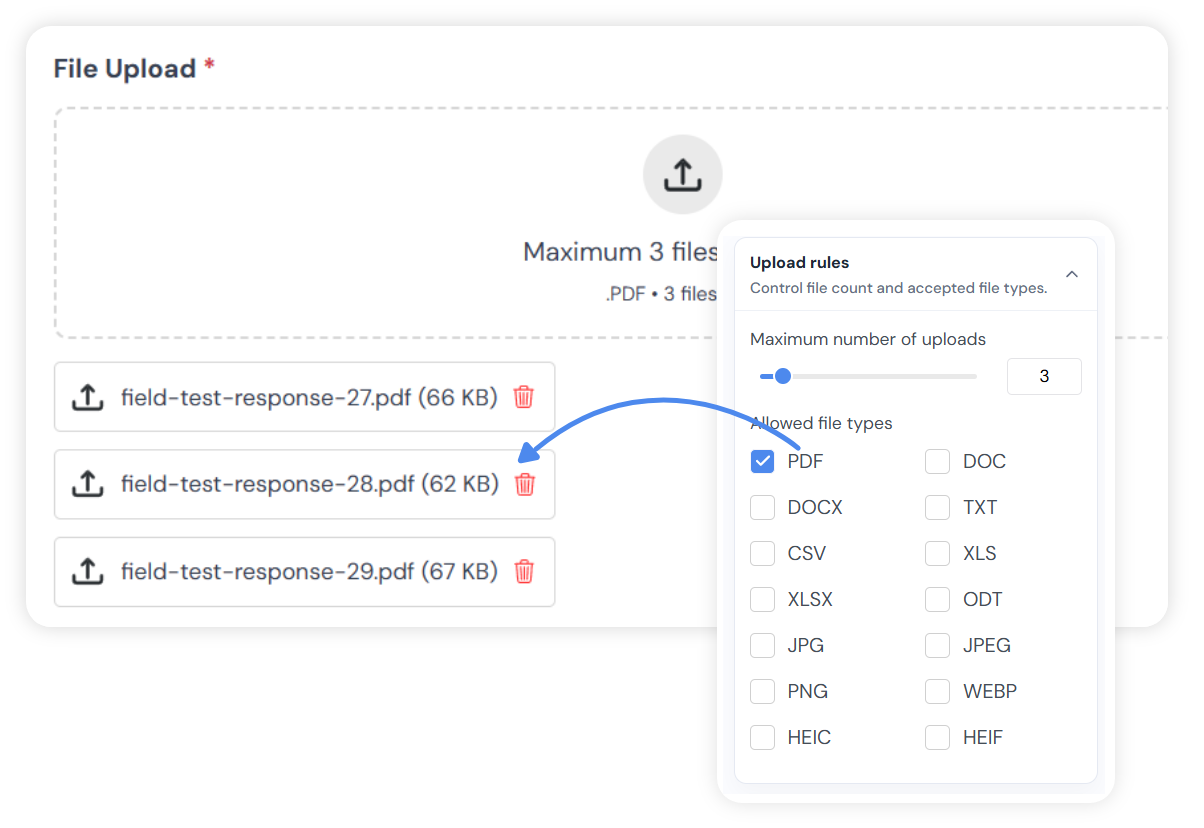
Exact field settings
Upload behavior is controlled inside the field settings panel
The settings are practical and form-specific: choose the limit, choose the extensions, make the field required if needed, and decide how the label, help text, and cover image should appear.
File upload field
Accept documents, archives, audio, video, images, and other configured extensions.
Image upload field
Accept image-specific formats such as JPG, PNG, GIF, WEBP, HEIC, and HEIF.
Upload size guard
Guest uploads are checked against the 25MB total size limit before submission.
In the response
Uploaded files stay attached to the submitted response
When a visitor submits the form, uploaded files are part of the response record. They can be reviewed from the response detail together with the answers and contact information.
Maximum uploads
Set how many files or images the field can accept, from 1 to 20.
Supported file types
Choose which extensions visitors can upload for that field.
Required field
Make the upload mandatory when the response depends on a file.
Label and help text
Hide the label when needed and choose where helper text appears.