
Lead Management
Track status, follow-up, outcomes, and notes on responses
In SmartFormify, lead management happens inside the response detail. Use statuses, follow-up dates, outcomes, notes, files, and contact details to keep each website enquiry clear after it arrives.
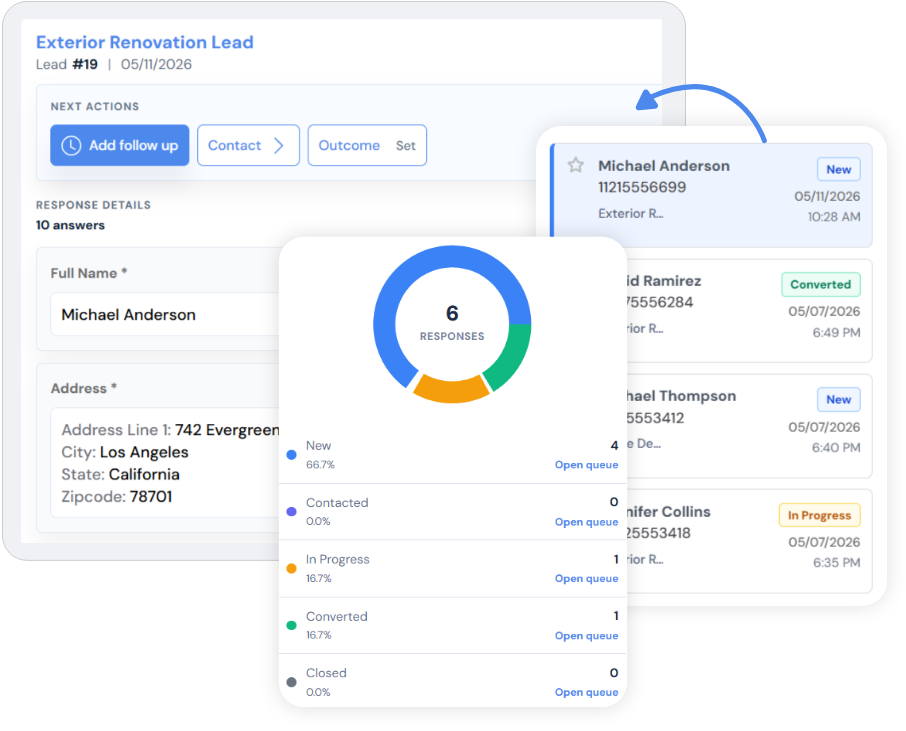
Exact response controls
The follow-up tools sit beside the submitted answers
A response can be marked with a pipeline status, scheduled for follow-up, given an outcome, and updated with internal notes without separating that context from the original submission.
New response
The form captures the details, files, and contact information.
Review
Your team checks the request in Inbox, Follow up, Important, or Trash.
Status
Move the response through New, Contacted, In Progress, Converted, or Closed.
Next step
Keep notes, outcomes, and follow-up timing attached to the response record.
What stays visible
The useful context does not disappear into an inbox
The original form and submission date
Contact details and preferred reply method
Uploaded files and longer answers
Internal notes, status, outcome, and follow-up timing
Status
New, Contacted, In Progress, Converted, or Closed.
Follow-up
Schedule a date and see overdue, due today, upcoming, or no-date states.
Outcome
Record what happened after contact, using the outcomes available in the response area.
Notes
Add comments so the next person can read the context before replying.